BiteScan POS
A responsive campus canteen POS for checkout, dual-unit inventory, scholar subsidies, credit transactions, and operational reporting.
Technologies Used
Project Info
- Status
- Completed
- Difficulty
- Hard
- Created
- Updated
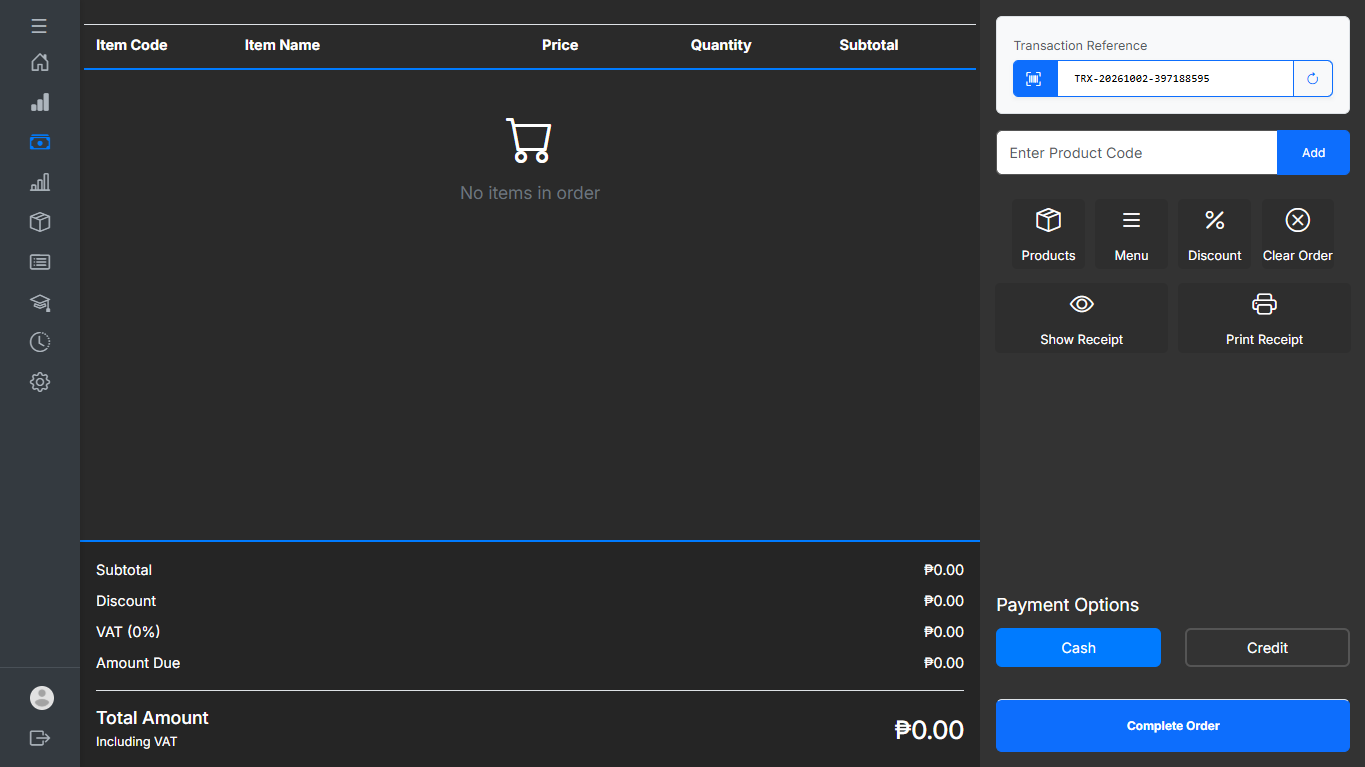
BiteScan POS
CASE STUDY / CAMPUS CANTEEN OPERATIONS
BiteScan POS is a web-based point-of-sale and management system for the Divine Word College of Calapan (DWCC) campus canteen. It connects checkout, dual-unit inventory, scholar meal subsidies, departmental credit, reporting, and audit trails in one responsive application.
System Overview
- Full title
- Canteen Point-of-Sale, Dual-Unit Inventory, and Scholar Subsidy Management System
- Institution
- Divine Word College of Calapan (DWCC)
- Application
- Responsive web-based POS and management system
- Backend
- PHP 8.3 / Laravel 11.31, MVC, Eloquent ORM, service layer
- Frontend
- Bootstrap 5, Sass, Tailwind utilities, Blade, Vanilla JavaScript
- Database
- MySQL, MariaDB, or SQLite with ACID transactions
- Reports
- PDF, TCPDF, Excel, PhpSpreadsheet, and DataTables BS5
- Currency
- Philippine Peso (PHP / ₱)
The Challenge
Canteen activity is concentrated around short break and lunch periods, while its records span cash sales, inventory, subsidized meals, departmental charges, and end-of-day reconciliation. When these processes are handled through separate manual records, checkout slows down, stock counts drift, duplicate subsidy claims become harder to prevent, and reports take longer to assemble.
Busy-hour checkout
Cashiers need fast totals, payment handling, change calculation, barcode support, and receipts while queues are forming.
Pack and piece stock
Products may be purchased in boxes but sold as either complete packs or individual pieces.
Scholar subsidies
Paper vouchers and lists make daily allowances, duplicate claims, and reconciliation difficult to audit.
Charge-to purchases
Departmental and faculty credit transactions need a visible approval trail instead of an informal logbook.
Operational reporting
Managers and finance staff need searchable sales, stock, scholar, and audit data with exportable reports.
Access control
Different users require different access to POS, inventory, scholar records, reports, settings, and security logs.
Project Objectives
The general objective was to develop a secure, responsive, and auditable web-based POS and inventory management system with scholar subsidy tracking for campus canteen operations.
- Improve transaction speed with barcode support, touchscreen number input, quick-cash buttons, discounts, and receipt generation.
- Keep pack-level and piece-level inventory consistent through a shared individual-unit quantity.
- Automate daily scholar allowance resets, claim checking, balance deductions, and history records.
- Manage departmental credit through a pending, approved, or declined workflow.
- Improve reconciliation with searchable records, low-stock warnings, dashboards, and PDF/Excel exports.
Users and Role-Based Access
BiteScan POS uses role-based access control so each user sees the operational tools appropriate to their responsibility.
- System Admin
- Users, roles, permissions, settings, maintenance mode, and security logs
- Manager
- Inventory, menu and pricing, scholars, financial audits, and credit approvals
- Cashier
- POS transactions, barcode scanning, scholar and credit payments, and receipts
- Staff / Finance
- Sales review, financial reconciliation, scholar audits, and report exports
Core Modules
Point-of-Sale
The POS interface keeps common cashier actions on one screen. It supports packaged products tracked by barcode or SKU and kitchen-prepared menu items sold for the day.
Dynamic cart
Real-time quantity, subtotal, discount, total, payment, and change calculations.
Fast input
Barcode scanning, touchscreen number pad, and quick-cash buttons for ₱20, ₱50, ₱100, ₱500, ₱1,000, and exact payment.
Discounts
PWD and Senior Citizen discounts at 20%, plus configurable student concessions.
Receipts
80mm and 58mm thermal layouts with downloadable DomPDF receipt output.
Scholar Meal Subsidy
Scholar records include the student ID, name, program, year level, contact information, daily allowance, current balance, and account status. A zero-carryover rule refreshes the allowance when the scholar first uses the system on a new day.
- Search by Student ID or name before processing a subsidized meal.
- Run resetDailyAllowanceIfNeeded() when last_allowance_date is not today.
- Check hasClaimedToday() to prevent duplicate daily claims.
- Record every credit and deduction in scholar_balance_histories with previous balance, amount, new balance, user, and transaction number.
Dual-Unit Inventory
Inventory uses individual pieces as the base quantity, then derives the number of complete boxes or packs. This keeps stock accurate when the same product is sold in two different units.
- units_per_group
- Individual pieces inside a box or pack
- base_quantity
- Total individual pieces remaining
- current_stock
- floor(base_quantity / units_per_group)
For example, 48 pieces with 24 pieces per box equals 2 complete boxes. Selling one piece changes the base quantity to 47 and the derived group count updates accordingly. Stock-in, stock-out, and adjustment movements retain their reason and responsible user.
Stock thresholds
Dashboard warnings when an item reaches its min_stock reorder threshold.
Expiry awareness
Warnings when an item’s expiration date is approaching.
Adjustments
Track damaged items, expired items, and physical count discrepancies.
Charge-to Department
Authorized departments, student organizations, and faculty can purchase meals without immediate cash payment. The cashier creates a pending transaction, then a Manager or Admin approves or declines it. Approval records approved_by and approved_at; declines retain the reviewer, timestamp, and reason.
Sales and Business Reports
Sales analytics
Filter by date range, category, cashier, and payment method.
Inventory valuation
Compare wholesale base_price and customer selling_price.
Scholar utilization
Compare subsidized meal usage with the allocated budget.
Exports
Generate PDF, Excel, and CSV reports for review and reconciliation.
Security and Auditability
SystemLog records the actor, action, module, IP address, user-agent, severity, previous values, and new values. Maintenance mode can restrict POS and administrative access while System Administrators perform system work. Login count, last login, and password recovery activity are also tracked through the application workflow.
Architecture
BiteScan POS follows a Laravel application structure with a service layer for domain operations such as scholar management, settings, and system logging.
User Interface → Routes and Middleware → Controllers → Domain Services → Eloquent Models → Relational Database

Services also write audit logs and use Laravel cache or sessions where appropriate.
Technology Stack
- Language
- PHP ^8.2 / ^8.3
- Framework
- Laravel 11.31
- Database
- MySQL 8+ / MariaDB / SQLite 3+
- Assets
- Vite ^6.0, PostCSS, Axios
- UI
- Bootstrap 5.2.3, Sass 1.56, Tailwind CSS 3.4.13, Blade
- Tables
- Yajra DataTables 11.0 and DataTables BS5
- Documents
- DomPDF 3.0, TCPDF 6.8, Maatwebsite Excel 3.1.61, PhpSpreadsheet
- Interaction
- SweetAlert2 11.x and Vanilla JavaScript
Key Workflows
POS Checkout
- The cashier scans barcodes or selects menu items and the POS calculates the cart total.
- The cashier selects cash, scholar allowance, or departmental credit.
- Cash payment records tendered amount and change while deducting inventory in the same transaction.
- Scholar payment verifies account status, daily claim eligibility, and available balance before recording a debit.
- Credit payment is stored as pending for Manager or Admin review.
- The completed workflow returns receipt data for thermal rendering or PDF download.
Scholar Allowance Reset
- Confirm that the scholar account is active.
- Compare last_allowance_date with today.
- If the date changed, restore current_balance to daily_allowance and log the credit.
- Check available funds and record the deduction in the balance history.
- Allow a configured partial or cash-split path, or decline an insufficient-balance claim.
Operational Findings
- Checkout time
- 90–120 seconds before → 15–25 seconds after
- Reconciliation
- 2–3 hours at end of day → real-time reporting
- Stock discrepancy
- 12% reported loss → under 1% attributable variance
- Scholar audit
- 3 days per billing period → one-click PDF audit export
- Credit loss
- Unverified chits → approval flow with accountability
Technical Decisions
Zero-carryover balance
A new day restores the allowance and creates a history entry instead of silently carrying unused funds forward.
Individual-unit stock
base_quantity is the source of truth; complete group counts are derived with floor(base_quantity / units_per_group).
ACID checkout
DB::beginTransaction() and DB::rollBack() keep inventory, payments, and transaction records consistent when an exception occurs.
Responsive POS
The same web application supports desktop barcode scanners and touch-based screens without a separate native client.
Future Improvements
- RFID or NFC student cards for faster scholar verification.
- A self-service kiosk for menu browsing, allowance checks, and meal pre-orders.
- Automated supplier purchase orders when inventory reaches min_stock.
- Multi-canteen synchronization for branches and satellite kiosks under one DWCC dashboard.
Conclusion
BiteScan POS brings checkout, inventory, scholar subsidies, credit approvals, reporting, and audit history into one connected canteen workflow. Its key design decisions address the operational details that are easy to lose in separate manual records: individual-unit stock remains tied to pack counts, scholar balances refresh and leave a ledger trail, credit transactions require review, and checkout changes are recorded with the inventory and financial data they affect.